
Dancing cats and ignoring instructions— Vibe coding with 20 San Francisco fourth graders
“That was fun AND confusing!” was the consensus today.
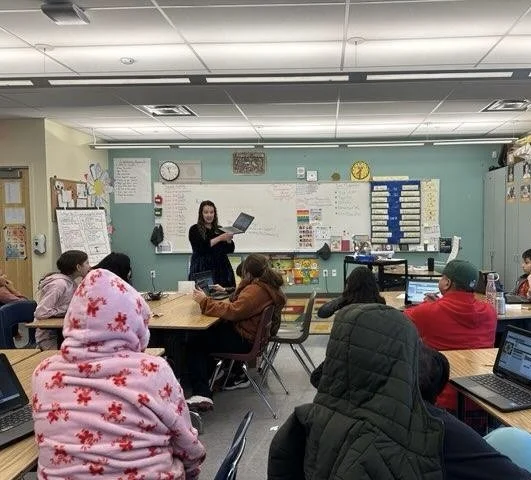
I volunteered in a 4th grade classroom today at Junipero Serra Elementary School in the Bernal Heights neighborhood. Thanks to the SF Ed Fund encouraging tech workers across San Francisco to participate in CS Education Week, I got to lead a vibe coding lesson with the class, following Hour of Code AI on code.org.
At the beginning of the lesson, an Ed Fund volunteer (Shoutout Katie from the Ed Fund’s Young Leaders Council) interviewed me in front of the class about my work. One question she asked was what I learned in school that was most helpful for my career. I gave my honest answer, which is that I always loved both my English and Math classes. Being good at reading, writing, and math is important for the job I’ve had for a long time as a product manager (and nonprofit leader), building websites and apps.
I asked the kids if they like reading and writing- most said yes but some said no, and I asked them if they like math- a lot of them said no. Then they pulled out their chromebooks and together we began the Hour of AI.
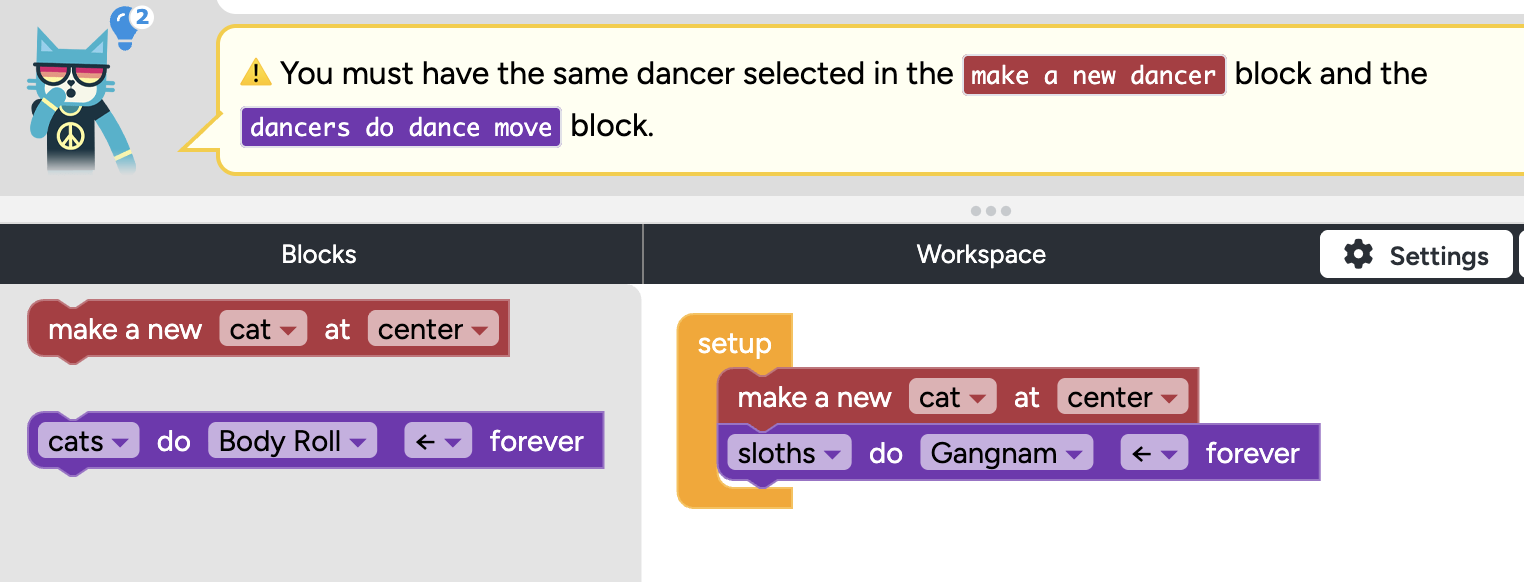
As the kids went through the lesson (which is fun! I recommend “Mix and Move with AI”) on their computers, I walked around the classroom helping students who were stuck (shoutout to Katie and Junipero Serra’s instructional coach who did the same). Over and over, the questions they asked underscored how important reading comprehension is to learning to code. This image shows the type of error message many of the students kept encountering. At this point they would raise their hands and say “Teacher, help!”
When I walked over to them, I would point to the error message and say “Well, it says you need the same dancer in the red box and the purple box. It looks like you have a cat in the red box and a sloth in the purple box. What can you do?” They would immediately fix it and move on.
I observed that:
Students were not paying attention to the error messages.
They were not reading the error messages carefully.
They were not following the clear instructions the error messages provided.
Though it was frustrating to see how often they ignored the instructions, I was happy that all of them were enjoying the lesson and working together. And how quickly they were able to “get it,” once I or someone else explained it to them. Nine year olds benefit from pair programming as much as adult engineers do. Many of them completed the lesson and proudly got their certificate at the end.
As we wrapped up the lesson and I asked them what they learned, the students reflected that the lesson was both “fun” and “confusing.” The Hour of AI succeeded in showing them how fun and accessible it can be to build something on a computer. But their struggles with the error messages made me reflect on the future of vibe coding and accessibility.
This code.org lesson is one of the most kid-friendly ways to learn the basics of programming- there’s fun colors, fun music you can choose, fun characters you can choose, and you’re making your characters dance. The kids “write code” by dragging colorful blocks around. Following the directions was tricky for them, but I also know that the kids could have generated a character dancing much more quickly by just writing or speaking a prompt into a different tool. This particular code.org lesson isn’t based on kids creating plain language prompts; it’s based on kids learning the language of code.org.
If the goal is just to create a dancing cat, today’s AI tools are much more forgiving than code.org. Kids can just write a prompt and can do so in plain language. If the goal is to make a dancing cat and understand the programming principles behind it, this type of hybrid writing- plain language + a bit more syntax- makes more sense. But in 2025, adults who vibe code don’t get error messages anymore- so maybe kids shouldn’t either.
I don’t know what the future of code.org lessons should be, in a world where getting the syntax right isn’t as important as it was even five years ago. I’m sure the team at code.org is thinking about it. Today, the spirit of vibe coding often means that instead of error messages, we get output like “well, I didn’t make exactly what you wanted, but how’s this…”
What I do know is that whether you’re nine or thirty nine, reading comprehension remains a key skill to vibe coding and building something new. Whether it’s an error message or an explanation of what was built, our reading comprehension skills— including patience, focus, attention, decoding, context, and critical thinking— are key. Without reading comprehension, we can probably make cats dance, but not much else.
